

Foothill Transit Class Pass
Contact Foothill Transit
Phone | 1-800-RIDE-INFO (743-3463)
Email | comment@foothilltransit.org
Website | foothilltransit.org/theclaremontcolleges
More Information
Riding Foothill Transit is easier than you think! Here are some tips for your ride.
- Use Google Transit or the Trip Planner at the top of our website to find out what bus line you need and where your nearest bus stop is located — then check NEXTRIP for real-time updates that show exactly when your bus will arrive.
- Go to your bus stop — it’ll be marked with a large sign in Foothill Transit blue and green.
- Make sure you board the right bus — when a bus pulls up to the stop, look at its line number and destination on the sign above the windshield.
- Pay your fare — just hold your Class Pass close to the “TAP” symbol right on the farebox and listen for the beep.
- Move as far to the back as you can, and find a seat or hold onto the handrail — please leave seats at the front open for elderly and disabled passengers.
- Request a stop — when the bus approaches your stop, pull the cord or press the tape running along the windows, then exit through the doors in the back!
Still have questions? Check out our Bus Basics, call us at 800-RIDE-INFO (743-3463), or visit our full website at foothilltransit.org anytime!
Activate Your Class Pass
Your FREE Bus Pass is Waiting – Ride Foothill Transit with Class Pass All School Year Long! There are two ways to claim your Class Pass.
For a physical TAP card:
- Visit the Connection. Bring your school ID, and they’ll verify your eligibility. Note: students need to be enrolled in at least one credit unit.
- Get your code and TAP card. The team at the Connection will give you a new TAP card and a special code to get your Class Pass.
- Visit taptogo.net/claremontclasspass to claim your Class Pass. Follow the prompts on the page and input your TAP card number and code. Note: your TAP number is on the back of your TAP card. You can also call 1-866-TAP-TOGO (827-2646) to activate your pass, too.
- You’re all set! Make sure to use your pass within 14 days of activation. You’re all set to ride for the academic year.
To use the TAP App:
You can also now get your pass on your smartphone. Download the TAP App to get your Class Pass today!
- Download the TAP app. Search “TAP” on the App Store or Play Store.
- Create a “TAP LA” account. Follow the prompts on the app to create your account.
- Click the Cards section to add a TAP card. Click the icon at the top of the screen then select either “Add a TAP Card to Apple Wallet” on iPhone or “Add a TAP Card to my phone” for Android.
- Enter the eligibility code. In the app, select “Add Stored Value or Pass” then select “Redeem Code”. Next, enter your eligibility code, which you can pick up from the Connection.
- Claim your Class Pass. The Class Pass will be added to your cart – don’t worry it’ll be free. Press “purchase” and you’re all set to ride! Make sure to use your pass within 14 days to activate it.
Need more help? Click here for more information using the TAP App to load your pass.
Make sure to use your pass on the bus within two weeks of registering online to activate your pass for the school year. Learn more at foothilltransit.org/claremont.
If you lose your Class Pass, visit the Connection, pay a $10 replacement fee, and you’ll get a new Class Pass on the spot!
Foothill Transit Lines 188, 197, 292, 480, 492, and 690 travel throughout campus, stopping along Indian Hill Blvd, 1st St, Claremont Blvd, and Foothill Blvd — check out the map for locations of stops. Lines 292 and 690 run Monday through Friday, while all other lines run seven days a week.
See below a map of the current Claremont Colleges lines and stops.
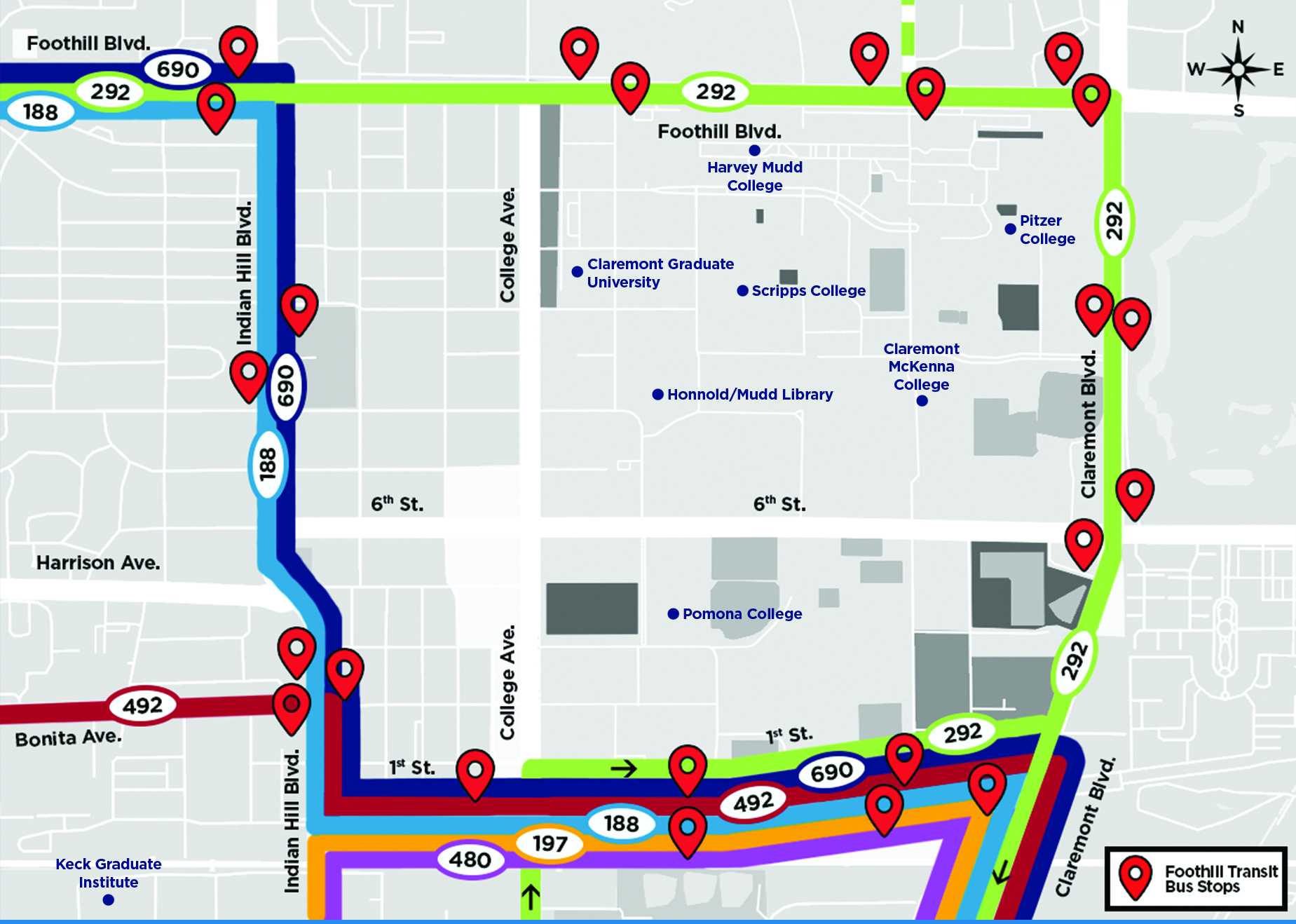
Anywhere Foothill Transit goes; you can go too! Buses travel throughout the San Gabriel and Pomona Valleys, and even go into downtown Los Angeles. Here are some popular destinations and how you can get there!
- Crypto.com Arena/LA Live/Convention Center – Take the Line 480 (West Covina) along 1st St. to the Pomona Transit Center and transfer to the Silver Streak (westbound/Los Angeles). Get off at Pico Blvd. and Flower St.
- The Broad/Walt Disney Concert Hall – Take the Line 480 (West Covina) along 1st St. to the Pomona Transit Center and transfer to the Silver Streak (westbound/Los Angeles). Get off at Grand Ave. and 2ndSt.
- Old Town Pasadena – Take Line 188 (Azusa) along 1st St. or Indian Hill Blvd. to the Azusa Intermodal Transit Center and transfer to Line 187 (Pasadena). Get off at Colorado Blvd.. and Marengo Ave.
- Montclair Place/Target/Best Buy – Take Line 480 or Line 492 along 1st St. to Moreno St. and Fremont Ave.
Need personalized directions? Give us a call at 1-800-RIDE-INFO (743-3463) or visit foothilltransit.org to plan your trip.